SmartLists for Jira
SmartLists for Jira puts a structured table on a Jira work item. Instead of tracking a checklist, a set of expense lines or a rate breakdown in the description field, you define the columns once, and users fill in rows.
Internally, we use this app to capture expense reports, order office supplies, define the "definition of done", and run quick calculations for new project estimates.
The four pieces
Panel - the structure of a SmartList: its name, its columns, and optionally the work types it applies to. Panels are configured per project, so what you build in one project does not appear in another.
Column - one field in the table. A column has a name, one of nine types, a required flag, and settings specific to its type (dropdown options, a formula, a footer total).
Template - a set of pre-defined rows belonging to a panel, plus an optional JQL condition and a rank. Templates let you apply a ready-made SmartList rather than an empty one, and can be applied automatically.
SmartList - what actually lands on a work item: a copy of the panel's structure, with the rows a user has filled in.
How they fit together
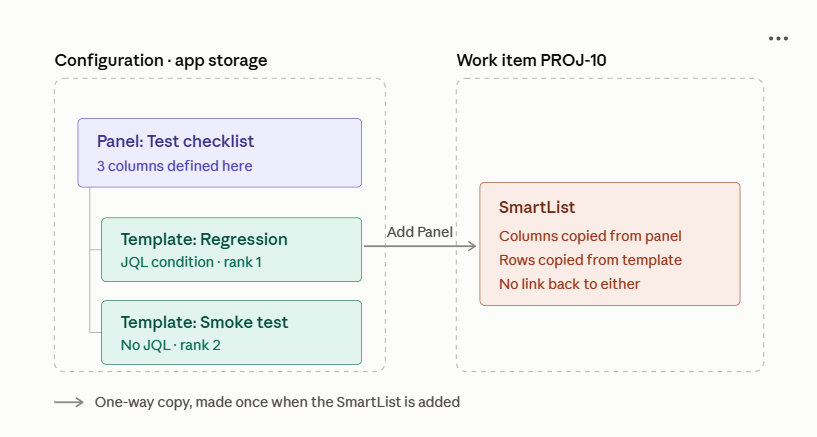
A panel becomes available on a work item when the work item's type is in the panel's Work Types list - or when that list is empty, in which case the panel is offered on every work type in the project.
A template is offered when its JQL condition matches the work item. A template with no JQL condition is always offered.
Where the app appears
Where | Who | What you do there |
|---|---|---|
Project settings → Apps → SmartLists for Jira | Project administrators | Create and edit panels, columns and templates |
The SmartLists for Jira panel on a work item | Everyone with edit access to the work item | Add a SmartList, fill in rows, export data |
Where the data lives
Panel and template definitions are stored in the app's own Forge storage, scoped to your site.
The rows a user fills in are stored on the work item itself, as a Jira issue property named smartlists-issue-data. Over the REST API that property is addressed as forge-smartlists-issue-data. This is what makes SmartList content reachable from Jira Automation, ScriptRunner and the REST API - see Using SmartLists data elsewhere.
One consequence worth knowing
The panel's column structure is copied onto the work item at the moment a SmartList is added. If an administrator later adds, renames or removes a column on the panel, existing SmartLists on existing work items keep the structure they were created with. Only SmartLists added after the change pick up the new structure.
Security
SmartLists for Jira is built on Forge, so your data stays on your Atlassian site.
What the app is granted
Three permissions, approved once by a Jira administrator at install time:
Permission | Why |
|---|---|
Read Jira work | To list the project's work types, test template JQL, and read work item attachments for File columns |
Write Jira work | To save SmartList rows onto the work item |
App storage | To store panel and template definitions |
Every Jira read the app performs runs as the person viewing the page, not as the app. A user cannot see work items through SmartLists that they could not already see in Jira, and template JQL never surfaces a work item the viewer lacks permission for.
Who can do what
The app defines no permissions of its own. Everything follows the Jira permissions you already have.
Action | Who can do it |
|---|---|
Install the app | Jira administrator |
Create, edit and delete panels, columns and templates | Project administrators, for their own project only |
Add a SmartList to a work item | Anyone who can edit the work item |
Fill in, change or delete rows | Anyone who can edit the work item |
Delete a whole SmartList from a work item | Anyone who can edit the work item |
See a SmartList | Anyone who can view the work item |
Export SmartList data | Anyone who can view the work item |
What personal data is held
The app does not collect personal data, but a SmartList can hold it:
User columns store Atlassian account IDs.
Text columns are free-form and hold whatever a user types.
Both can live on the work item as an issue property and are deleted with the work item. Panel and template definitions in app storage contain no personal data.